In Outcomes, when we discuss an applicant's status, what we are referring to is the relative position they occupy in the chronological flow thru your organization. I.E. 01-Orientation Complete, 02-Intake Forms Pending, etc. By and large, the system calculates this automatically, based on triggers, some of which can be set by users with administer permission. See creating Auto Notes and Agency Referrals.
But, for each applicant, at any point in time, you can go in and manually update their current status.
Click the STATUS link in the Links & Programs table.
or
On an applicant's note page, click the Status button.
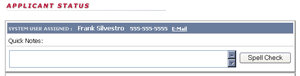
The applicant status page has 2 main sections. The quick note, part of Quick Status, which automatically flags an applicant account for immediate action.
To enter a quick note, simply type it in, spell check, if you like, and click the Submit button.
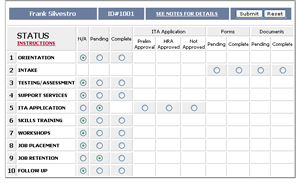
The second part of the page is the actual status.
Updating an applicant's status could not be easier. Simply check the option button corresponding with the condition you want noted. Then click the Submit button.