This is the contact management feature for employers. To get to a specific employer's notes: Click the Employers tab, then...
Select an employer from the dropdown. On the file page, click the Notes button (top right).
or
Enter an employer contact person's name in the text box, then click Go. On the Directory page, click 
or
Enter an employer company name in the text box, then click Go. On the Directory page, click
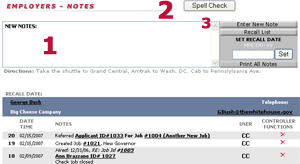
You'll notice that most often the system will type in your contact notes automatically.
See System Generated Notes for a list of them.
But, occasionally, you may want to type in something yourself. When that happens...
1-Type the note into the box.
2-Spell Check it if you like.
3-Click the Enter New Note button.
Setting a Recall Date
You may wish to set a reminder to contact an employer on some future date. In that case, follow any of the instructions above to get to that employer's notes page.
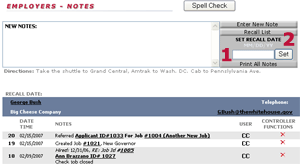
1-Enter the recall date.
2-Click the Set button.
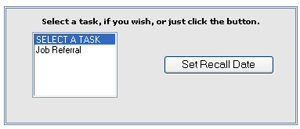
On the task page which opens, select a task (optional) then click the Set Recall Date button.
Recall Task Manager
The recall task manager administration (creating new and editing existing tasks) is performed in the admin section. To create or edit tasks, a user must have Administer Permission.
 Click the Admin Icon on the top of the system page for links to the dropdown lists.
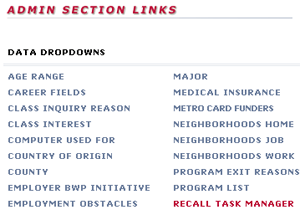
Click the RECALL TASK MANAGER link.
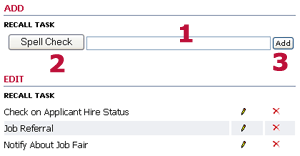
1-Type the task into the box.
2-Spell Check if you like.
3-Click the Add button.
To edit a recall task, click its  .
.
To delete, click the  if available.